MCConsole + MCBuss
One console plugin, two complementary parts.
MCConsole + MCBuss is one console product split into two parts. Place MCConsole as the very first plugin on absolutely every mix track. Place MCBuss last on the Master track, before any tape processing such as MCTape. Both parts are included in a single €10 purchase.
10 € · One-time purchase · Standard + Metal included
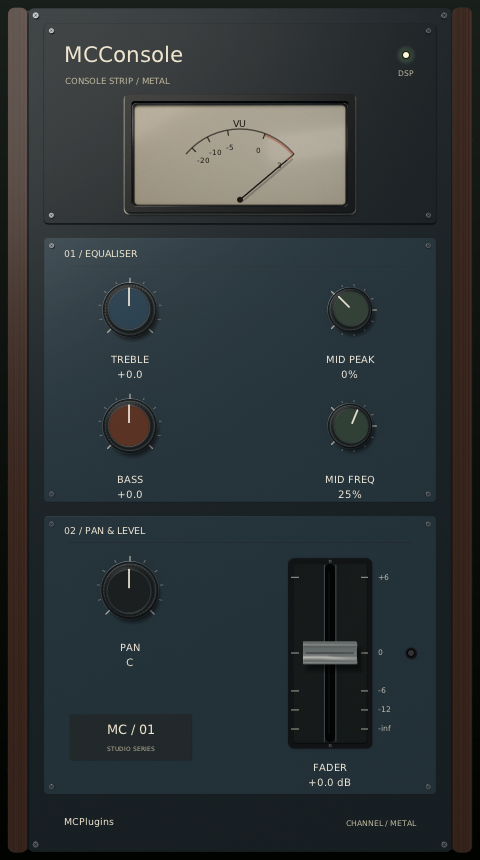
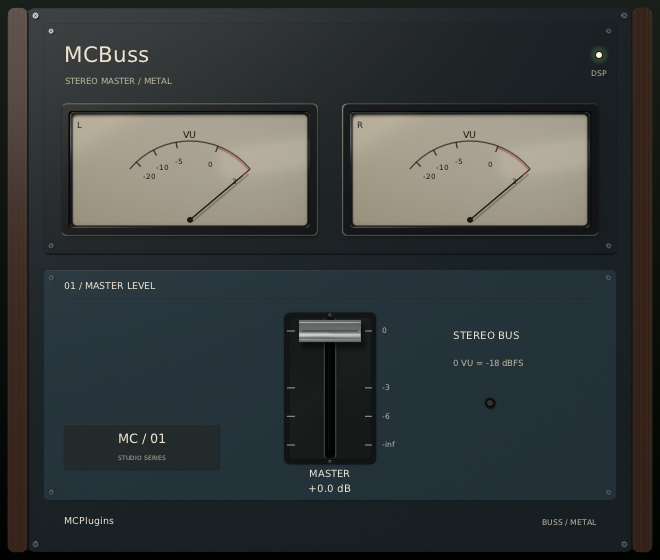
METAL FINISH SHOWN · STANDARD + METAL INCLUDED
Specifications & compatibility
- Product
- MCConsole + MCBuss — one console plugin in two parts
- Price
- 10 €
- Formats
- VST2 · VST3 · CLAP · AU
- Platforms
- Windows x86_64 · Linux x86_64 · macOS Intel · macOS Apple Silicon
- Finishes
- Standard + Metal — both included, same DSP
- DSP
- Chris Johnson / Airwindows
- Distribution version
- 0.6.0
- Delivery
- Digital download after verified PayPal payment
VST2, VST3 and CLAP for Windows, macOS and Linux. Audio Units (AU) for macOS Intel and Apple Silicon.
Version 0.6.0
- Click the DSP LED to bypass all processing.
- The matching Auto Gain LED starts a short measurement, then locks the correction until a setting changes; hover for help.
How to use it
- Insert MCConsole as the very first plugin on absolutely every mix track, before any other processing.
- Route those tracks to the Master track. Place MCBuss last in the mixing chain, just before the output to any tape processing (for example MCTape).
- Use both parts together: they form the same console system.
Installation & downloads
Approve payment on PayPal, then return to MCPlugins to check and finalise your order.
After payment verification, your private order page provides both finishes and all four platforms for your purchased product.
A purchase summary is sent to the email address provided by PayPal.
Keep your private link and do not share it. Contact support if the email does not arrive.
Find your plugins and updates in My purchases ↗
Sign in using a one-time email link, with the same email address as your PayPal purchase.
No password or account creation before purchase is required.
- Extract the archive and read the included instructions and licences.
- On Linux or macOS, run
bash install.sh.
On Windows, follow the included README to runinstall.ps1. - Rescan plugins in your DAW.
What you are buying
The MCPlugins graphical interfaces and their ready-to-install distribution.
The original Airwindows DSP remains unchanged and is also available free from its creator under the MIT licence.
Third-party licences and attributions are included in the archives.
MCPlugins is an independent project, neither affiliated with nor endorsed by Airwindows.
MCPlugins commits to paying Chris Johnson half of each sale price: 5 €.
This is paid separately by MCPlugins, not automatically by PayPal.
Questions & answers
Do I need to buy MCConsole and MCBuss separately?
No. A single €10 purchase includes both parts of the console plugin, in Standard and Metal finishes.
Where should I insert MCConsole and MCBuss?
MCConsole must be the very first plugin on absolutely every mix track, before any other processing. MCBuss must be the last plugin in the mixing chain on the Master track receiving those tracks, just before the output to any tape processing such as MCTape.
Are Standard and Metal both included?
Yes. Every purchase includes both finishes for all four platforms. They use the same DSP and can coexist.
How can I contact the seller?
Seller identity and contact details are available in the legal notice.